Use Pages as your working record
Write the plan, attach context and keep the next decision beside the saved result.
Explore this guide
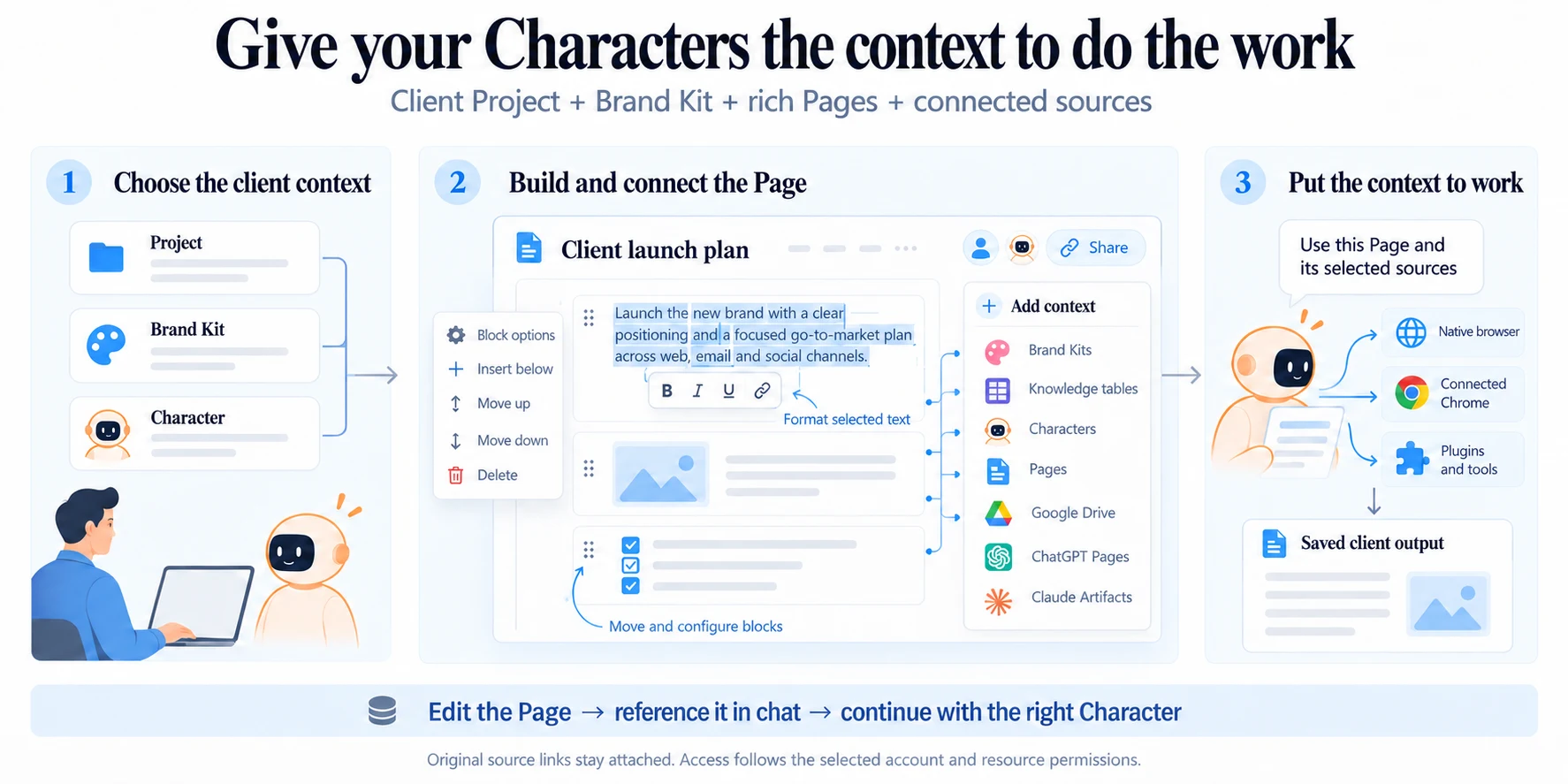
Build the Page
- Open Spaces and create or choose the Page for this work.
- Add a clear title and brief. Use headings, lists, checklists, images and other supported blocks to organize it.
- Use Add context to attach relevant Brand Kits, Knowledge, Characters, Pages or connected sources.
Build the Page
- Open Spaces and create or choose the Page for this work.
- Add a clear title and brief. Use headings, lists, checklists, images and other supported blocks to organize it.
- Use Add context to attach relevant Brand Kits, Knowledge, Characters, Pages or connected sources.
- Ask the Character to use this Page, and name which section it should read or update.
- Reopen the saved Page after the work and check the result.
Edit text and blocks
Select text to use the nearby formatting toolbar. Use the separate block grip for whole-block actions such as moving or configuring a block. These controls serve different purposes.
For a longer workflow, keep the brief, source references, review checklist and next human decision on the same Page.
Continue with care
When asking an agent to edit, identify what must remain. The Pages tools use the current saved document and revision checks. If another person has changed the Page, read the latest version before retrying a conflicting update.
See how the parts connect